
Feed library
The feeds you use, with nutrient values and prices.
Rations
Group rations with dry matter, cost and animal count.
Daily distribution
Feed given to groups; a day without entries shows as a routine task.
Feed stock
Receipts, consumption and remaining quantity; an alert before it runs out.
Feed cost
Daily and per-cow feed cost, broken down by feed.
Income over feed cost
What remains after feed cost is deducted from milk income.
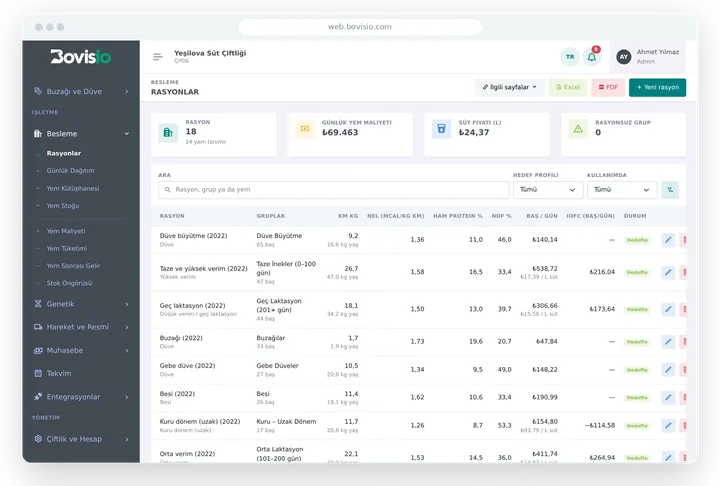
Rations
Ration to the group, feed to distribution
The rations screen lists each ration's group, animal count, dry matter and daily cost. The ration your advisor assigns from Bovisio Advisor appears here; you enter the daily distribution accordingly.
- Dry matter and cost
- Rations from your advisor
- Assignment to groups
Feed cost
How much are you spending on feed?
The feed cost analysis shows the total daily cost, the cost per cow and the feed cost per kilogram of milk. The breakdown by feed reveals which feed affects the budget most.
- Feed cost per kg of milk
- Cost breakdown by feed
- Stock forecast and consumption

FAQ
Questions about Feeding and rations
Yes. You can create a ration from the feeds in the library and assign it to a group. If you have an advisor, they prepare the ration and send it to your farm.
As the daily distribution is entered, the feeds used are deducted from stock. You record feed purchases as stock receipts; the stock forecast calculates how many days it will last.