
Herd Management
Calendar, scheduled work and tasks
All scheduled work such as insemination, pregnancy checks, vaccination, dry-off, calving, weaning and treatment follow-up is on the calendar. Overdue, today's and upcoming work are counted separately; once done, it drops off the calendar.

Overdue work
Work past its date stands out in red.
Today
The list and count of today's work.
7 and 30 days
The workload for the coming week and month.
Filter by type
Vaccination, weaning, insemination, calving, treatment.
Team
Work is visible to users with permission.
Linked to records
Completing a task means the related record has been entered.
Calendar
All the month's work on one screen
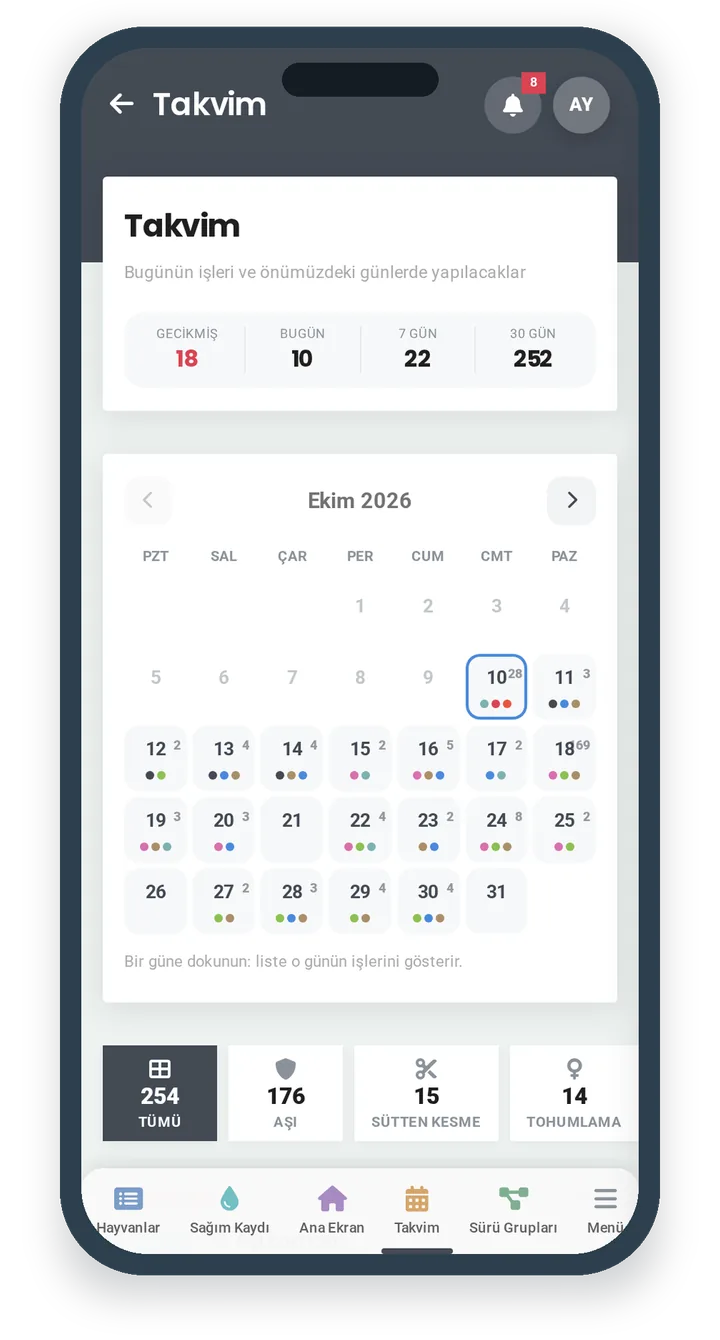
In month view the calendar shows the work falling on each day with coloured dots; click a day to open its list. The side panel groups overdue and today's work by type.
- Month view and day list
- Overdue work kept separate
- From task straight to the record screen
On the phone
Today's work in your pocket
In Bovisio App the calendar opens with overdue, today, 7-day and 30-day counts. With the vaccination, weaning and insemination tabs you finish the job in the barn and enter the record at the same time.
- Summary with counts
- Tabbed task lists
- Record in one tap
FAQ
Questions about Calendar and tasks
Most tasks arise automatically from records: a pregnancy check after insemination, dry-off and calving after pregnancy, vaccination days from a vaccination program and so on.
When you enter the related record (for example a pregnancy check result), the task drops off the calendar and the next step is scheduled.